Build the tools you wish Grapple had.
A plugin is a tool you pick up like the Pen. It draws its own handles on the Viewer and the Timeline, puts its settings in the Inspector, and sends every edit through History. Write one in Python, or describe it to Ape and let Ape write it.
The small job you do every week.
A plugin turns a chore you repeat into a single press, or a drag on the frame.
Every ratio, one drag each
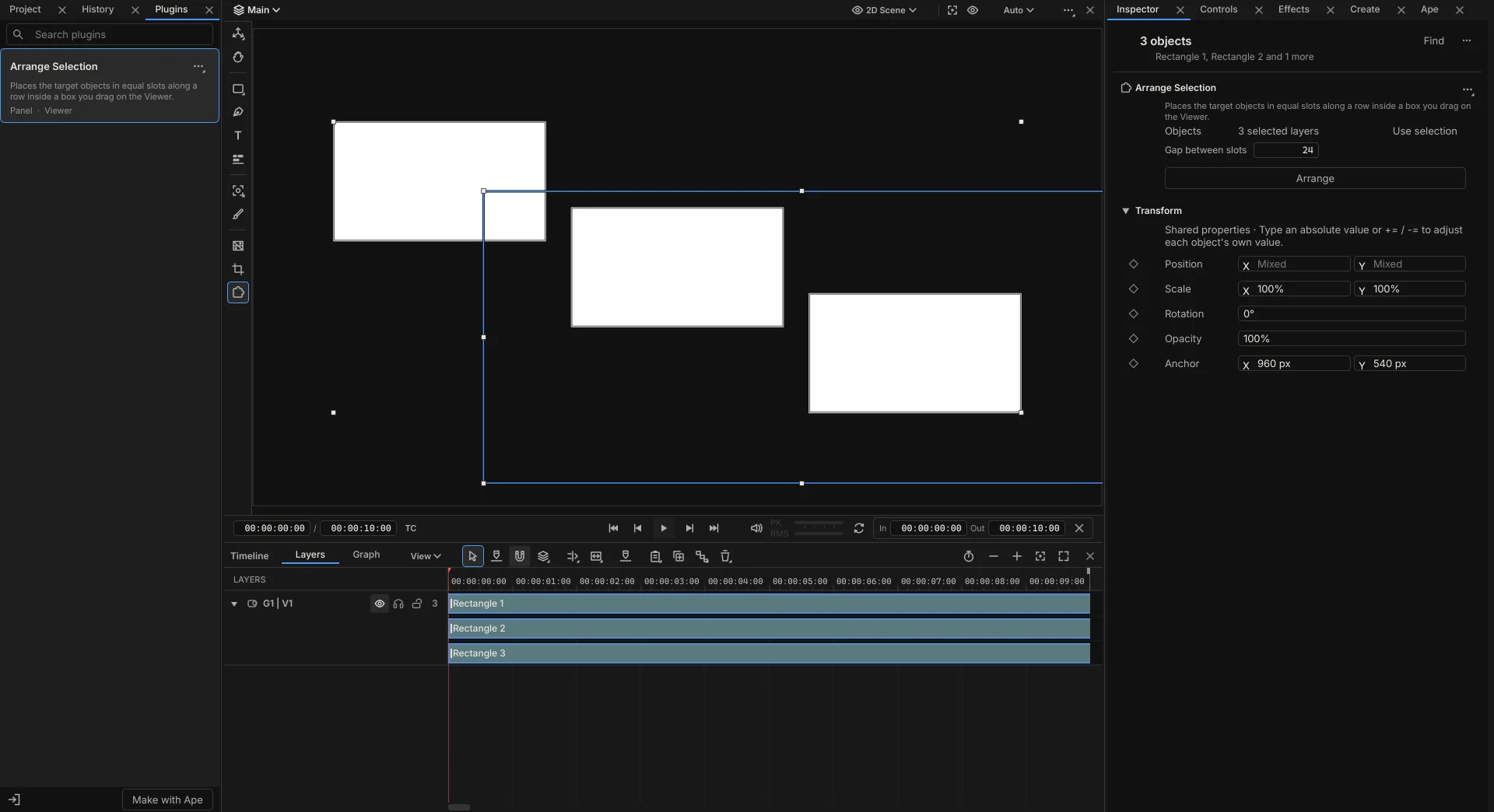
If you make social videos, you lay out the same product shots in the square, vertical and wide versions. Your plugin can draw a box on the Viewer and space the selected layers evenly inside it, with the gap as a setting in the Inspector.
The nudge you always type
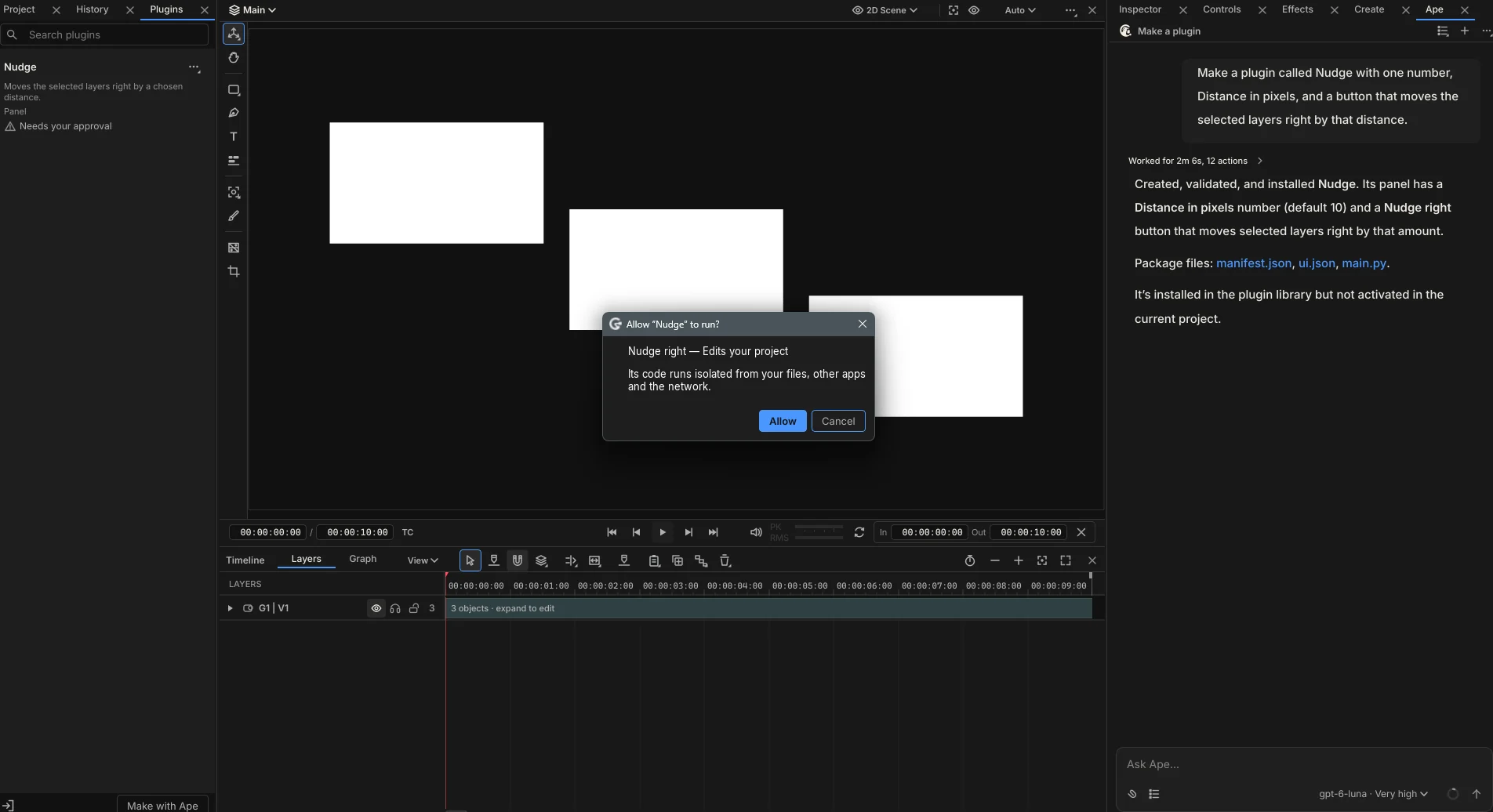
You move layers by the same distance all day. Nudge has one number and one button, and each press is one row in History called Nudge right.
It works where you work.
Click a plugin's card in the Plugins tab and its icon joins the tool rail beside the Stage. Its section opens at the top of the Inspector with a row for what it acts on, such as “3 selected layers”, and a Use selection button.
While it's in your hand, its shapes on the Viewer and the Timeline draw and take your drags. A click outside them still selects as usual. Choose another tool and it steps aside, and it remembers its settings for next time.
Describe it, and Ape writes it.
Choose Make with Ape in the Plugins tab, or just ask in the chat. Ape writes the plugin, checks it, and installs it in your library.
This request made Nudge, start to finish: Make a plugin called Nudge with one number, Distance in pixels, and a button that moves the selected layers right by that distance.
You approve the code, not Ape
The first time a plugin runs code, Grapple shows its own dialog, titled with the plugin's name. It lists each action as “Edits your project” or “Reads your project”, and Cancel is the default.
Its code can't reach your files
Plugin code runs isolated from your files, your other apps and the network. Approval covers that exact version, so a plugin that changes asks again.
Or write it yourself.
A plugin is a manifest, a small interface file and a Python file. Grapple draws the interface with its own controls, so a plugin looks and behaves like the rest of the app.
{"schemaVersion": 2, "id": "personal.nudge", "version": "1", "label": "Nudge",
 "description": "Moves the selected layers right by a chosen distance.",
 "ui": "ui.json", "python": "main.py",
 "capabilities": ["project.read", "project.edit"],
 "settings": [{"id": "distance", "label": "Distance in pixels",
               "valueType": "number", "default": 10}],
 "actions": [{"id": "nudge_right", "label": "Nudge right",
              "effect": "projectEdit", "arguments": ["distance"]}]}
import grapple as gp
def nudge_right(ctx, distance):
for layer in ctx.selection:
position = layer.get("Position")
layer.set("Position", gp.Vec2(position.x + distance, position.y))One action, one History row
Each action is one function named after it. Its row in History takes the action's label, and one undo takes it back.
Told what to write, before it runs
If something is missing, Grapple says exactly what without running your code: main.py: define def nudge_right(ctx, distance): for the action nudge_right.
Keep them, share them.
The Plugins tab sits beside Project and History. Each plugin is a card that says what it does and where it works: a panel, the Viewer or the Timeline.
Import a .grapple-tool file or a plugin folder, export your own to pass on, or open one with Edit with Ape. Each project keeps its own copy of the plugins it uses, so tidying your library never breaks an old project.
Make your next video with Ape.
Grapple is free during the public preview. It runs on Windows and keeps itself up to date, and the Mac version is coming very soon.